Many of my projects eventually reach a point where I have a large list of things I’d like to add or implement, but not much of an idea how to prioritize the list, or if users will even find what I’m thinking of useful.
For these cases, I like to implement my work item voting mechanism. Here’s a brief overview of how I’ve implemented it. Maybe you can take the idea and apply it to a workflow of your own.
Back End Implementation
Vikunja, The Task List Source
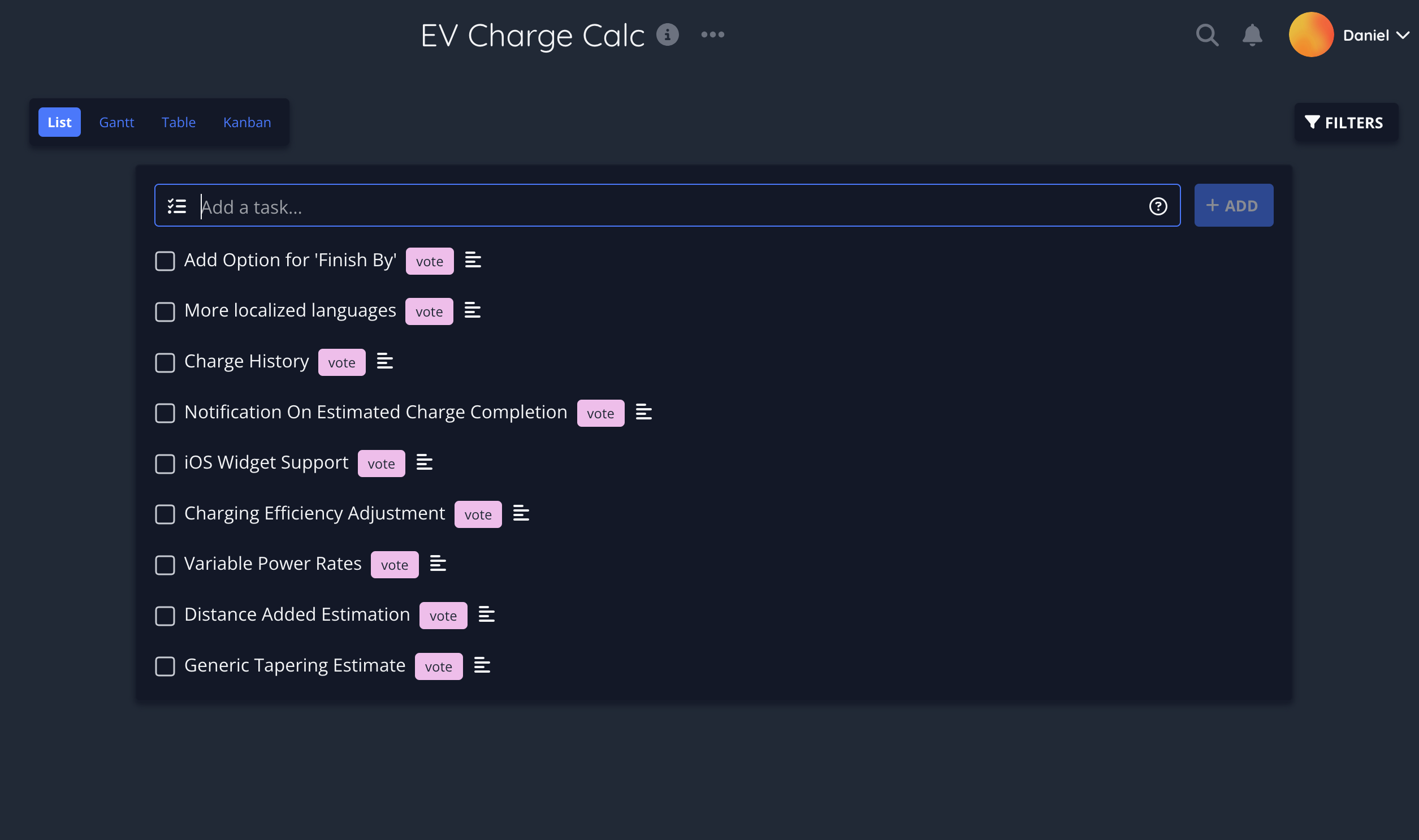
I use a variety of methods to implement my many todo lists.
Vikunja has wound up as my preferred “internet-based” task list manager. I self-host it on my webserver and I can access it on my phone at home or while I’m away.
I much prefer this solution to other cloud-based task list apps, because it doesn’t charge me a monthly subscription to create multiple projects 😊.
And as a nice side-effect of using an open-source todo list, it also means I can build applications and custom endpoints off of Vikunja’s API without being subject to the whims of a large corporation who might decide to cut off API access for whatever reason.
So I decided that Vikunja would become the primary database for holding my work item data.
The first task was deciding on a way to limit which tasks my apps’ users can see, obviously not every task in there should be presented to the user to be voted on. (Who would vote for internal refactoring?)
To manage this, I used a new tag assigned to tasks called “vote”. Descriptions are also used to provide additional information that can’t be contained by the limited title space.
I also experimented with using tags as a way to communicate things to users, such as marking tasks with “Up Next” to show which tasks I would be working on next, and using the task’s “Done” flag to signal that an update was imminently arriving.
I also integrated a public share link to the task list into my apps, so the user could use their web browser to see things like work-in-progress videos for upcoming features.
In the end, however, I decided that managing these tags and WIP videos was too much overhead for me to doing by hand, so I don’t do it as much anymore. The core functionality is covered simply by the “vote” tag and descriptions, which power the custom voting API.
Custom Workitem Voting API
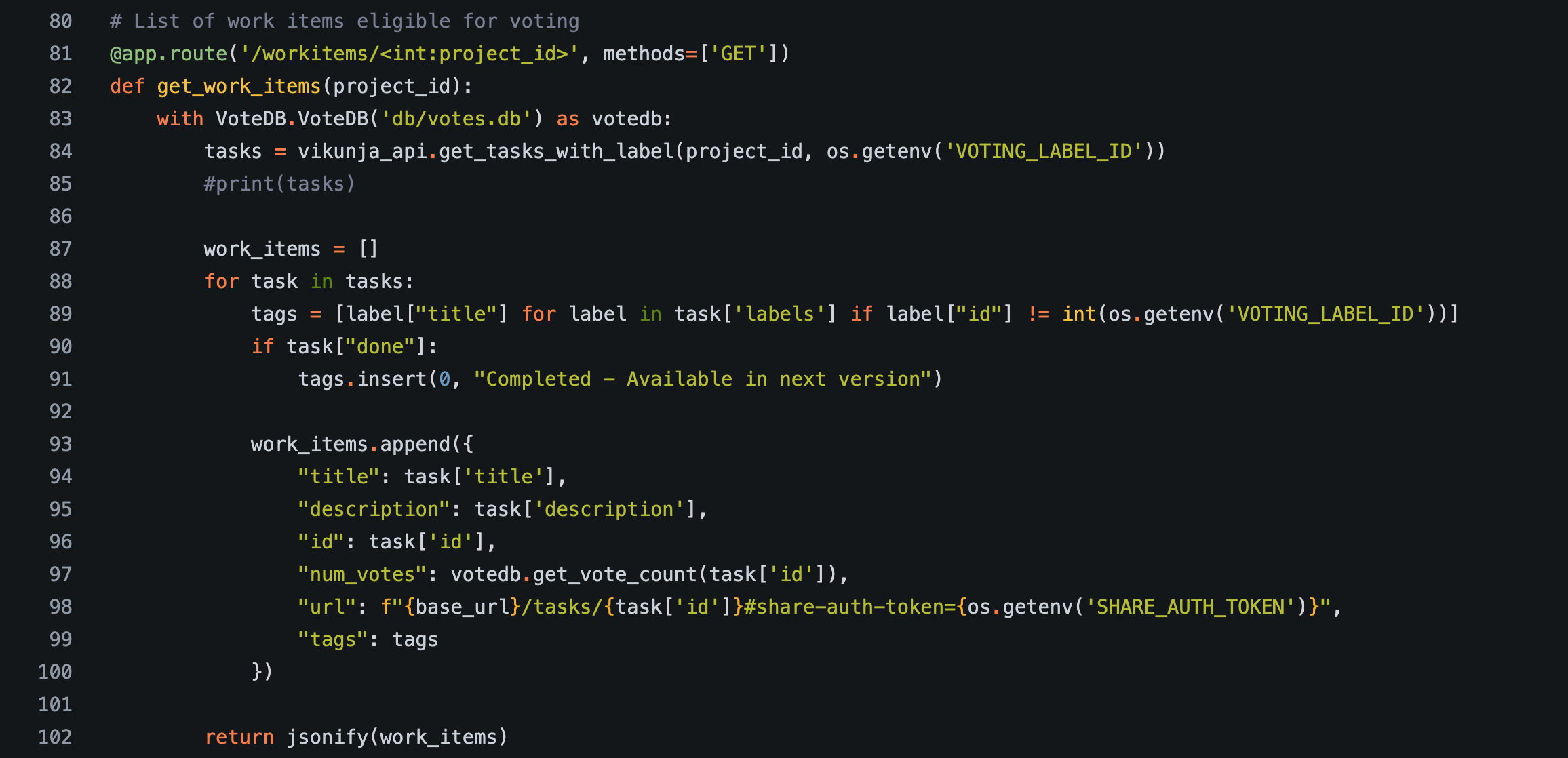
Voting on tasks isn’t something that Vikunja has built into it, so to have any functioning voting feature I will need to write my own API which my app users can call.
This API also acts as a safety net around my Vikunja instance, as I definitely don’t want users to be directly interfacing with my work list.
Since my last few projects have all used Flask for API’s I decided to make this one in Flask as well for no reason other than familiarity. To be honest, there’s probably a way simpler way of implementing this API layer as there’s very little code inside the app itself.
To keep track of the votes, I decided to use a sqlite database. The DB is dead-simple with just a couple of tables.
The table tracking votes simply keeps a mapping of task id to the current vote count.
There’s also another table which tracks the historic vote count for each work item, which is just the same table with an additional “timestamp” column.
This app has a few different responsibilities as far as the work item voting feature goes:
- When the user asks for the list of vote-able work items, it queries the Vikunja server for those “vote”-tagged tasks and fetches the current vote counts from the database.
- When the user submits a vote, it updates the sqlite DB.
- Every 24 hours, it updates the vote history table by appending the current vote counts.
- I also experimented with having an auto-updating comment in Vikunja with the current vote count, but it hasn’t been very useful for me. It turns out that I don’t spend much time looking at Vikunja without a reason to.
- And as a special secret just for me (and secret-key protected), it also handles clearing the vote counts after I ship a new update containing a voted-on feature.
That’s the backend complete, let’s look at what the user sees.
The User Experience
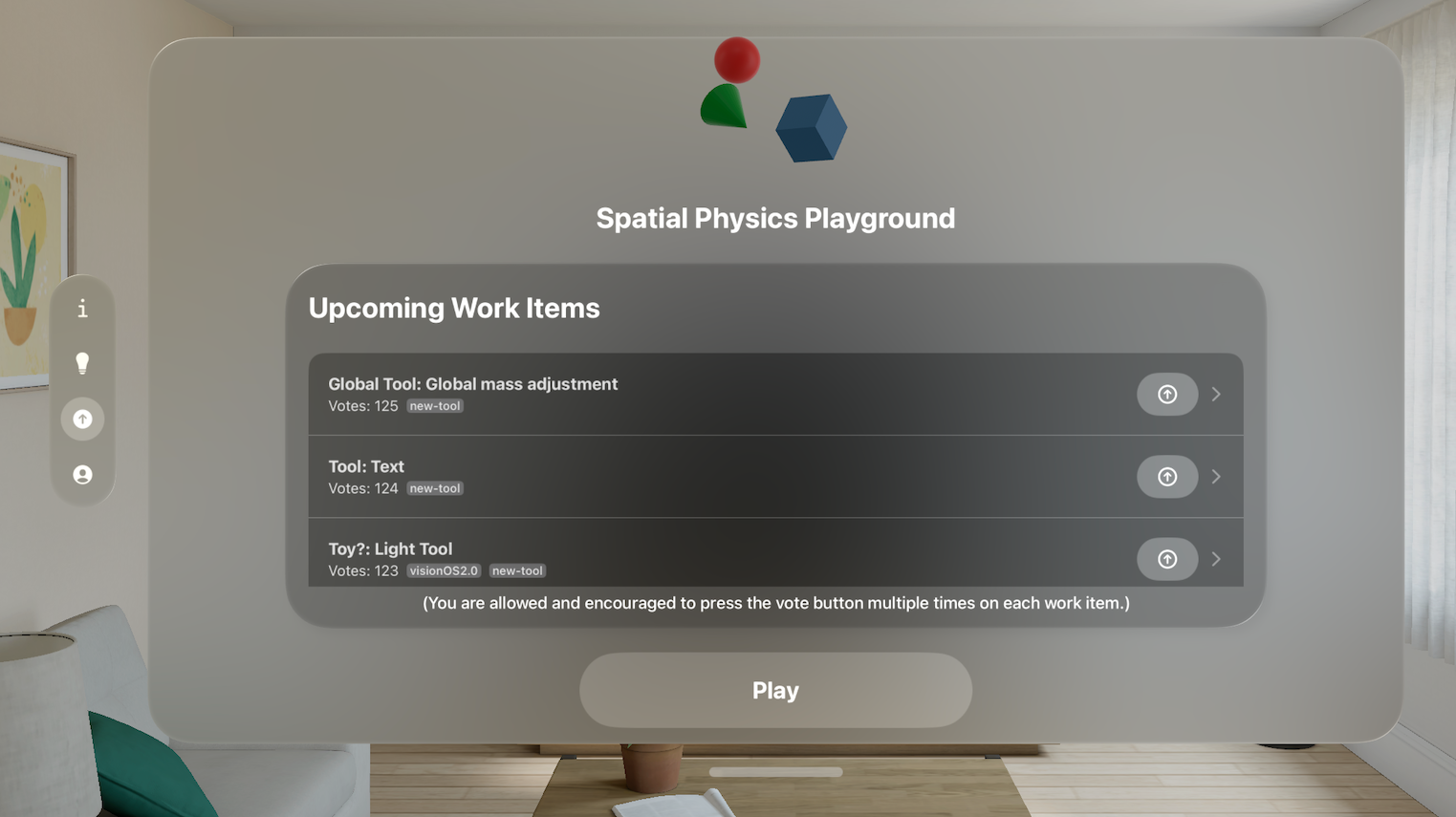
In my apps, I usually have a dedicated menu to display the list of vote-able work items. This list contains the work item title as well as a description and its current number of votes. And finally, the most important part, a button to increase the vote count.
When it came to designing how the vote function worked, I wanted there to be a small amount of user expression. To that end, the user is able to hit each task’s “Vote” button multiple times. There’s even a message encouraging them to hit the vote button as many times as they like.
I’ve had bug reports from users who see this as a problem. Someone could completely reorganize this list to suit their own preferences!
Personally, I don’t see this as much of a problem. Though I will admit, I’m dealing with fewer than 1,000 users. Perhaps things change at larger scales.
-
First, I don’t constrain myself to working on solely the top-voted item by vote count. After all, there’s tasks I’m working on which the users aren’t voting on.
-
Second, the fact someone willingly sat there for multiple seconds, possibly even minutes, tapping a little button to express their opinion…it ought to count for something.
-
And finally, nothing drives engagement like seeing a mis-prioritized list. 😊
The ability to vote many times does present some problems, though.
Not everyone wants to spend time hitting the button repeatedly. Many opt to hit the button just a single time. Shouldn’t a task with votes from 10 people score higher than a task with 10 votes from one person?
How do I make it so a user’s single vote has impact even when a task’s vote counts reach into the hundreds?
And also launching these apps just to view the current vote count is getting quite annoying…
It’s time to make a web-based dashboard so I can look at the current vote counts from my phone.
My Voting Dashboard
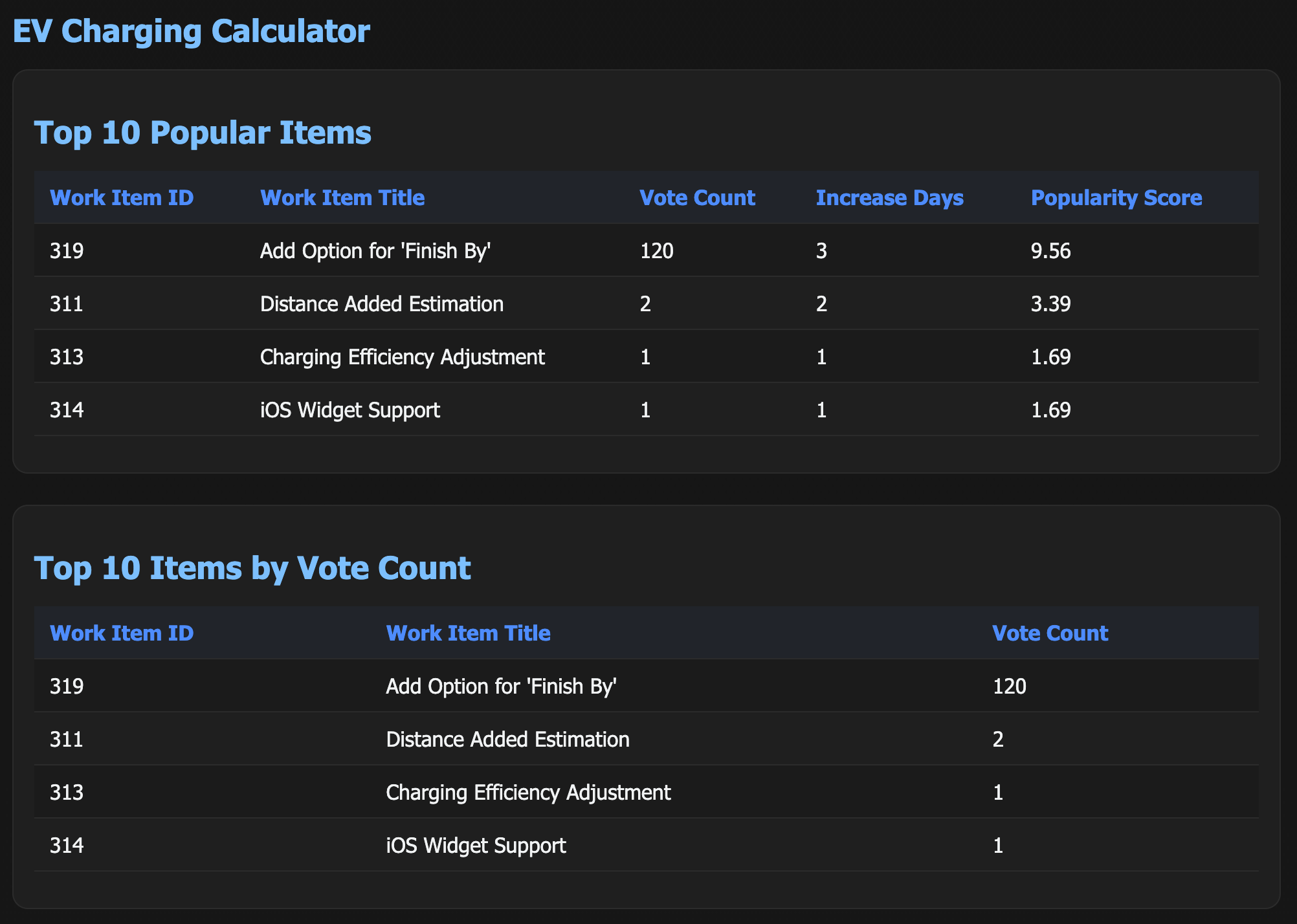
The dashboard is baked into the voting endpoint. Again, mostly out of convenience. The dashboard endpoint isn’t public information, so the only person who’s going to be requesting it is me.
And for that reason, the dashboard isn’t a static page, it gets generated from the voting database information on every request.
My primary view on this dashboard is a “popularity” metric, which uses a custom formula to reorganize the work items based on my custom metrics.
There’s a problem, though. I want to boost the votes of people who only vote once or twice, but I don’t store IP address information of voters (and don’t intend to start). So I don’t have an exact way to determine total number of unique voters on a work item.
However, voters are so sparse that we have an easy proxy: “increase-days”. These are days in which the vote count for a task increased. It’s usually days, if not weeks, between votes, so this acts as a good enough stand-in for the number of unique voters.
The dashboard also displays the top 10 tasks by vote count, just as they’re displayed in the app.
And the last table I see (which isn’t pictured above) is one which displays tasks with new votes received in the last 24 hours, which also displays the exact count of new votes a work item has received.
Please ignore how long these work items have been sitting around for.
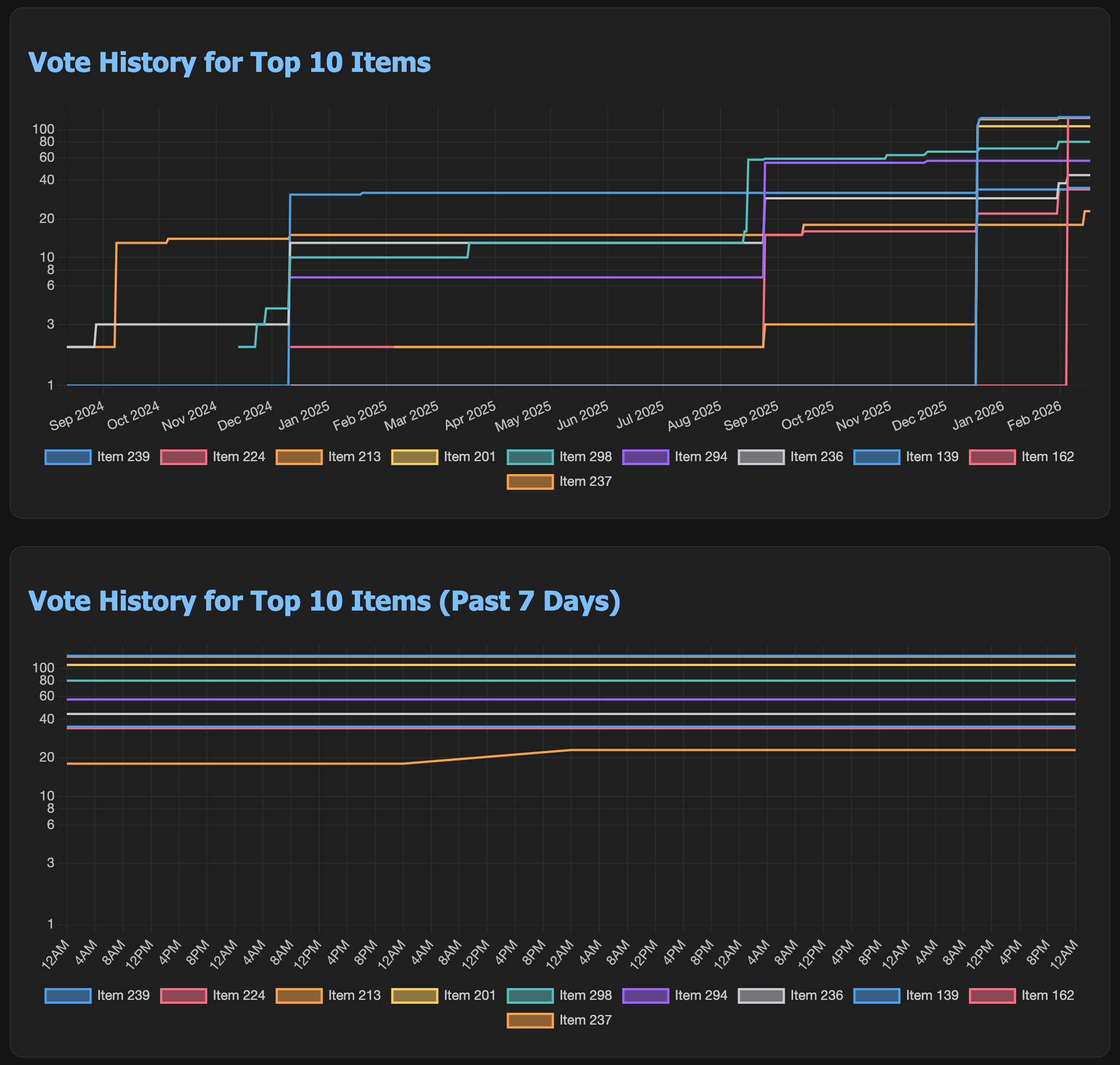
And finally, I have a few graphs of the historic vote count for work items. One which displays the complete history, and one which displays the last week. These graphs show me the vote distribution over time, and helps me to confirm that the popularity metric feels right.
These graphs use a logarithmic y scale, as the work items can have anywhere between 1-150 votes. The logarithmic scale helps to introduce space between tasks.
How I Use The Information
While I always strongly consider what the users are asking for, user votes are only a part of the decision making process, not all of it.
Personally, I find it difficult to work on a single project for months straight at a time. I like to rotate between several projects, moving between them over time. I find that this helps to keep my interest maintained in the project for a longer time.
My primary goal when doing development is to learn new things and explore new features and libraries I haven’t worked with before. Like with my features, I generally have a vague list of things I’d like to learn. But I’m not always very particular about the order in which I go about learning.
So when I get back around to working on one of these projects with user feature voting, I like to see what people have been voting on to let their preferences guide my learning.
And that’s pretty much all there is to say about my voting mechanism.
Maybe now that you know how it’s done, you can go off and implement your own voting mechanisms in your own apps.
Let me know if you have any questions or comments, I’d love to hear from you!